
Download
Download
If you want the simplest setup, start with the MSI installer. The homepage highlights that version first, while this page collects the other install methods in one place.
Installer / Setup
Recommended. Free for home use. Professional and commercial use require a paid license. See Pricing for the current options.
3.108.0.0 (2026-09-26)
MSI MD5:
b2a22c1c25aa00ba5869ea65ecd98e4c
MSI SHA256:
fdc57e58231c166e22176f3421f05c5336fc377ccfa21aa1c96a121439b62e0d
Portable
Unblock zip and extract in a new non-system folder.
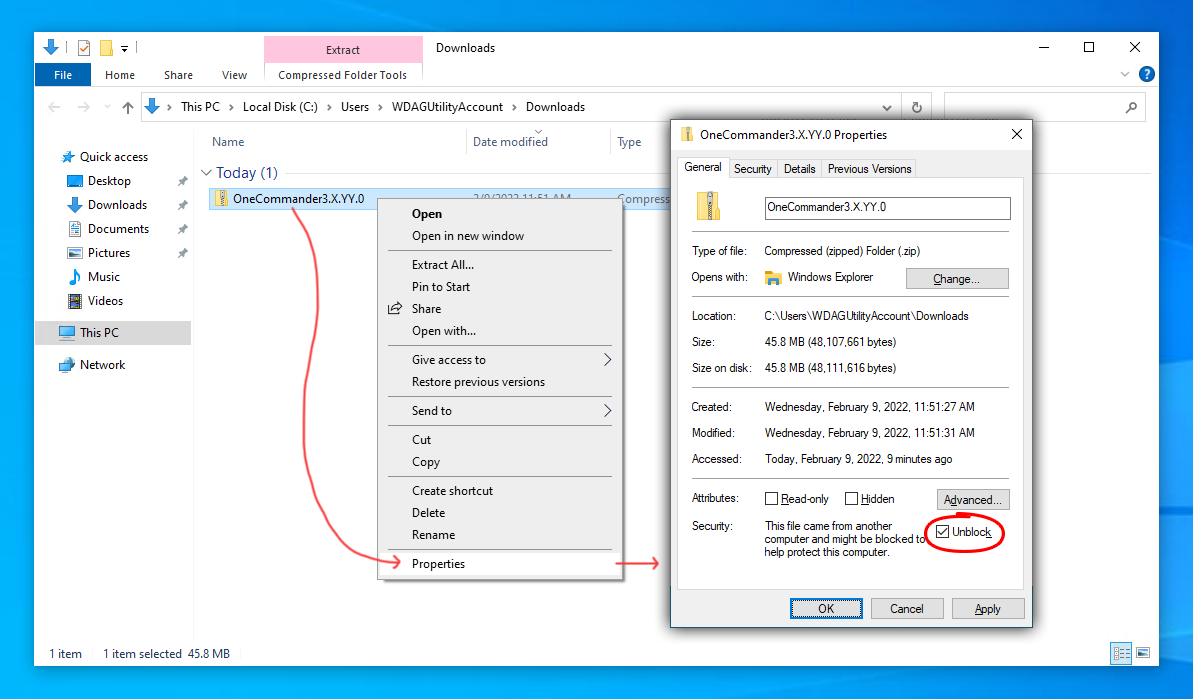
Note: Must not be installed in a cloud folder; Not for computers with more than one user account.
ZIP MD5:
8fb980549609a3abddbc3b02019fef77
ZIP SHA256:
b05aa68f82a5845d0b4af0230b8d0f70ae39b299cdd882643856bb8721b17d06
Package managers
Wingetwinget install OneCommander --source winget --silent
Scoopscoop bucket add extrasscoop install onecommander