
Notice
Important
 Help bringing this to Microsoft's attention by upvoting this issue on their Feedback Hub (if you are affected).
Windows 11 Update Issue (May/June 2025)
Recent Windows 11 updates—KB5063060 and KB5060842—released in May/June 2025 have disrupted file operation dialogs (copy/move/delete) in third-party file managers including OneCommander.
As a result, progress dialogs may only appear once and then stop showing entirely. Operations still complete. Microsoft has not acknowledged the issue, and no fix timeline is known.
Workarounds:
-
Option 1: Uninstall the Updates
Navigate toSettings > Windows Update > Update history > Uninstall updates, and remove KB5063060 or KB5060842 (whichever is listed). -
Option 2: Enable Classic File Operation Dialogs
Go toOneCommander > Settings > Advancedand check Use classic file operation dialogs to use Windows 7–style dialogs.
-
Option 3: Use Taskmaster (Beta)
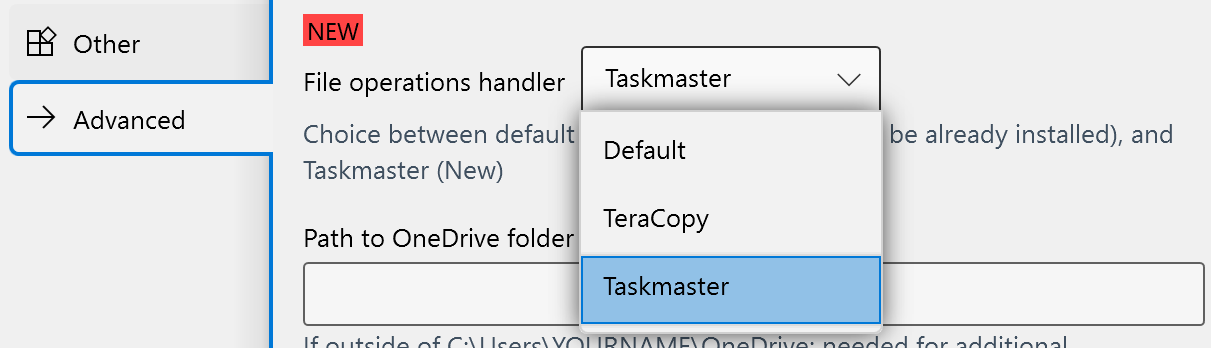
InSettings > Advanced > File operation handler, select Taskmaster, OneCommander’s built-in file operation manager (currently in Beta). -
Option 4: Use TeraCopy
Install TeraCopy
InSettings > Advanced > File operation handler, select TeraCopy.
Note: TeraCopy is a third-party tool and is not affiliated with OneCommander.
Help bringing this to Microsoft's attention by upvoting this issue on their Feedback Hub (if you are affected).
UPDATE
It seems that Microsoft has released a fix on Windows 11 with KB5062660 , starting on July 22.
"Fixed: File operation progress dialogs might stop appearing when displayed from apps."
Look for this update in Settings if you are affected